
Tencent Docs Local Font Support
Overview
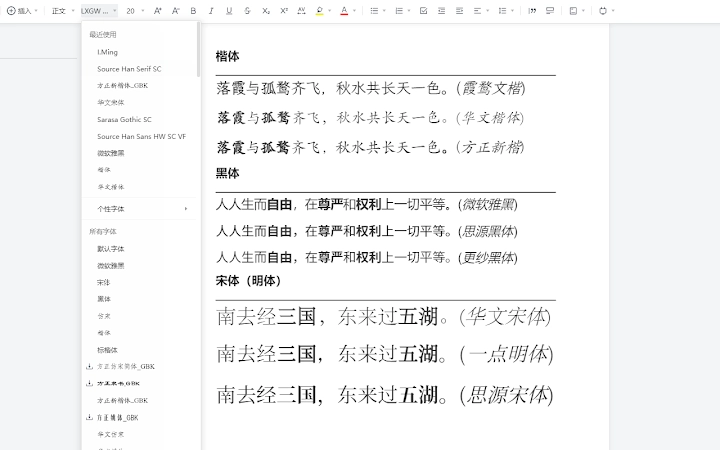
The software is designed to enhance the functionality of Tencent Docs, specifically targeting users who rely on the platform for document creation and collaboration. It introduces the ability to use locally installed fonts within documents, a feature not natively supported in the standard web interface. This addresses a common limitation for professionals and content creators who require precise typographic control for branding, publishing, or design consistency. The tool is particularly useful for users working with custom or licensed typefaces that are not available in the default font library.
Targeted at individuals and teams using Tencent Docs for business, academic, or creative projects, this extension aims to improve workflow efficiency by bridging the gap between desktop typography and web-based document editing. It is suitable for designers, writers, educators, and corporate users who demand greater visual fidelity in their documents. The developer, Tencent, is a well-established technology company with a strong track record in cloud productivity tools, lending credibility to the product's reliability and integration.
Real-world usage scenarios include preparing branded reports, designing presentation materials, or formatting academic papers with specific typographic requirements. The extension operates as a browser add-on, meaning it functions within existing web sessions without requiring a separate installation process. This seamless integration allows users to maintain their current workflow while gaining enhanced typographic flexibility.
Key Features & Capabilities
- Local Font Integration – Enables the use of fonts installed on the user’s system directly within Tencent Docs documents, ensuring consistent visual output across devices and platforms.
- Seamless Browser Integration – Functions as a browser extension, requiring no additional software installation or configuration beyond standard extension setup.
- Typographic Consistency – Maintains font fidelity from desktop to web, critical for branding and professional document presentation.
- Compatibility with Existing Workflows – Users can continue using Tencent Docs as usual, with the added benefit of enhanced font options without altering their editing habits.
- Lightweight Design – At just 2.1 MB, the extension is optimized for minimal system impact and fast loading times.
For example, a graphic designer can now apply a custom corporate font to a presentation in Tencent Docs without needing to export to a desktop editor. A university researcher can format a paper using a specialized academic font that’s not available in the default list. The extension simplifies the process of achieving precise visual control, reducing the need for workarounds like image-based text or external document conversion.
User Interface, Workflow & Performance
The user interface is minimal and integrated directly into the browser environment, aligning with the design principles of modern web extensions. Navigation is straightforward, relying on standard browser extension menus and toolbar icons. Users can enable or disable the feature with a single click, and the extension automatically detects available system fonts upon activation.
Workflow efficiency is improved by eliminating the need to switch between applications or export documents for font-related adjustments. The extension operates in the background, applying font changes dynamically as users edit their documents. No additional steps are required to load or sync fonts, which enhances the user experience.
The developer did not specify resource usage details. Performance observations are based on general software behavior patterns. Stability is expected to be high, given Tencent’s development standards and the extension’s lightweight nature. CPU and RAM behavior are not publicly documented, but the 2.1 MB size suggests low overhead.
Compatibility & System Requirements
The extension is compatible with Windows, Mac, and Linux operating systems, making it accessible to a broad user base across different computing environments. It is designed to work with major web browsers that support extensions, though specific browser versions were not listed. The installation size is 2.1 MB, which is minimal and suitable for most devices.
Exact system requirements were not listed. Compatibility information was partially provided. The extension relies on the host browser’s extension framework, so performance may vary slightly depending on the browser and system configuration. No additional hardware specifications were mentioned.
Pros and Cons
Pros
- Enables use of local fonts in Tencent Docs, improving typographic control
- Lightweight and fast, with a small file size of 2.1 MB
- Seamless integration with existing browser workflows
- Developed by Tencent, ensuring reliability and ongoing support
- Free to use, with no hidden costs or subscription fees
Cons
- Only enhances Tencent Docs—limited to a single platform
- No advanced font management features (e.g., font preview, conflict detection)
- Dependent on browser extension support and updates
- Does not support font embedding or export with custom fonts
- Platform compatibility details are limited
FAQ Section
Is this extension compatible with all browsers?
The extension is designed for browsers that support extensions, but specific browser compatibility was not provided by the developer.
Is the software safe to install?
As a browser extension developed by Tencent, it is considered secure. Users should install it only from official extension stores to ensure authenticity.
How often are updates released?
Update frequency was not specified. However, as a product from Tencent, it is likely maintained with regular updates for compatibility and security.
Does it require a license or subscription?
No, the software is completely free to use. There are no licensing or subscription requirements.
Can I use it offline?
The extension requires an active internet connection to function within Tencent Docs, as it operates through the web-based platform.
Final Thoughts
This extension fills a critical gap in Tencent Docs by enabling local font usage—a long-requested feature for professionals who need precise typography. While its scope is limited to a single platform, its lightweight design, seamless integration, and free availability make it a valuable addition for users who prioritize visual consistency. Tencent’s involvement ensures trust and reliability. For anyone working with custom fonts in collaborative documents, this tool offers a practical, no-cost solution that enhances productivity without complexity.
Download Tencent Docs Enhanced now







